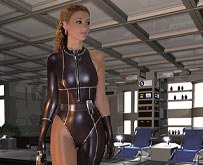
Nov - 04: Added a portrait oriented version of: 'Maid Phoebe'.
Nov - 01: Phoebe is warm and hot as a rubber '3-star Servant Maid'.
Oct - 04: Back to the 80's! Victoria Principal in tight, shiny, aerobic latex 'is ready for the future'!
Sep - 27: Marlene finds herself on all fours on a table getting 'Re-educated'.
Sep - 06: New image for CoEI, 'A New Beginning'.
Aug - 23: 4F Redux, more latex shine in 'Morning Refuel'.
Aug - 15: New images, Mercedes and Marcella star in 'Rise & Shine!
Featured Content
-
Works in progress
You might have noticed that the site was unavailable (404) last week. That was due to the fact that I forgot to update the server DNS records (oops!). To be honest, I thought that was the hosting provider's job. Anyway, it only took about a day and all is working now again.Last image project (The 'No way home' images + M&M story chapter) launched a new creative wave here.Last year was quite rough at times. It was the first year after I had lost both my parents within 7 weeks, and about a year after my father's passing, the grieving process (finally?) began. Those were tough days, especially my mornings. Strangely enough, I didn't realize I was going through this until it was behind me, sometime late November 2025.There was last year little inspiration or time (so much paper/tax work etc. to take care of) to start writing on the various projects. But over the past two or three weeks, that energy and inspiration seem to have reappeared.Works currently in progress:Terra's 6 :I started this three years ago, but then I got stuck and suffered from writer's block. Life as we know it came also by and dealt a few sledgehammer blows. But last week I picked up the thread again, and now I know how to get from A -> B. There will be only one image accompanying the second chapter, and it won't be a 'wow' image, just a woman sitting in a chair in an old, rusty (if I can make that rusty aspect work, that is) old shuttle interior. It just has to fit alongside the text, and from there we (literarly) enter more interesting territory.I've also found an interesting new crew member. Fondly remembered by some when she was "protecting the world from aliens and other evil entities like a multi-headed, poisonous snake monster."The Castle of Evil Incarnation (CoEI) :Now that is a though one. How many times did I restart this? I'm afraid to learn the answer. Anyway, I plan this time to keep going where I left off:It was difficult to find the right photos to continue with this model. That held me back, until I realized that more than one escape capsule might have landed here. I will probably have to adjust the accompanying text, but oh well, no one will object to that. By the way, I am not dropping this model; by adding another one, I gain more possibilities. I may even have already discovered how to get the old 'Serena' model back in play. (Yeah, 'her again') A.I.T. : Another project that has gone into hibernation. Past month I started collecting the final photos from the photoshoot and I am now looking at how best to fill in the last 1-2 pages. It takes an awful lot of time to 'latex-ify' these photos, which is why I haven't used them yet. I have kept thinking about it, but I really have to set aside a lot of time for these. Moreover, I don't have many unused photos left from this shoot, and I have resolved to use only these photos and not combine them with other photos. That limits my options for incorporating them into the comic. But it's back on my horizon. I'm not going to let this sit in the hybernation chamber for another 3 years...I need to create better tentacles though.Fantasy : The thing this site started with and got known for: skin-tight, shiny dressed superheroines!It has been a while (more than 2 years) since anything new appeared there. Well, I currently have something new in the works that falls into that category. You might remember this very, very old image from way back, good ol' 1998:I'm currently working on a 'Seafood II', and maybe a bit later, if I can figure out what I want/like (with tongue & teeth or without, or both if time permits) a female Symbiont.MNW : Always continuing, I found myself wanting to see more one-piece swimsuit girls (in shiny latex of course), located in the beach resort we could see a bit of behind the windows here:So you can also expect to see more of 'Mar Magico' and its inhabitants. (This is just a teaser).To be continued...-
- 5 replies
Featured by Rick 4F -
-
Work in progress - Patrol 2016 (Part 1)
I made this image in 2002. Part of the models where made by Matt Wilson, part where re-remodeled using Matt's models, by me just to get some tri's away. It's just (another) 'tick' I have, I just cannot stand to see (unneeded) tri's (triangular shapes) in 3D models. >.>All nice and dandy you may say. Yet at some point I started to dislike the image, for one and probably the most nagging thing in this image is that she doesn't really shine. Her suit has this somewhat dull shine over it. It doesn't has this shine as magical as polished latex has. There's no 'snug vacuum sealed' feeling.Secondly there's something 'wrong' with the camera angle, the way the 'pool' tries to cut out of the bottom of the image, gives it a quit distorted feeling.And thirdly I f-ed her face up.Which is the reason why I never went over this image again, which should be easy. Just reload the 3D C4D file, re-render, open up in photoshop, pick up the paths of the final image, polish the girl up and put the 2 together.Alas, something something went terribly wrong around 2002 as for starters I couldn't find the final image nor the 3D file. Which meant I had to start largely from scratch. And with a 'been there, done that' feeling I just left the image and moved on to other projects. Though it didn't completely disappear from my mind.Working on these new 4Forums I looked through my Cinema 4D files & models to see if I could add some nice free 3D models to the download section and ran into the communication tower from Space 1999.Because of some unneeded tri's here it can use another remodel round but this got me thinking back of this old image from 2002 and I for some reason really liked the idea of taking it up again and fix all those things that where nagging me. So step 1: re-re-model some of the most basic Moonbase Alpha shapes. And then just start putting the modules together in a way that resembles (somewhat) the old background.I do modelling, texturing and lighting as I go. It's said you should keep those 3 separate but, meh, it's how I like to work. Going over some research over at Google... I noticed that those light emanating planes are quite different then how I use them above. Just a texture with lumination on a polygon and global illumination in the render settings.You cannot use it alone as light source because of the many ugly artefacts iit creates. These plastic panels aren't emitting light anyway they only pass it through as you can see here:You can see that it are milky-white panels with a large light source behind. Also notice how light fades away to the sides and bottom. Only thing I could find how this worked in reality was an image of a tall wooden pole and 3 bulbs of light on it that was lighting the milky-white panels from behind. Not an option for me here, so I'm experimenting with something else.I made a milky-white texture with specular, reflections and some transparency put that on the panels that let light trough and then behind them, not only put a "real" light but also build a light emitting box that gives some fake impression of some space being behind the walls. Creating a more realistic feeling then a light emitting texture on a polygon.This 'light-box' goes behind the round walls, and I have a similar one square shaped for plain straight walls. This is as far as I got before deciding to put my attention back on the next image I had been working on just before I picked up the idea to redo 'patrol'.-
-
- 1 reply
Featured by Rick 4F -
-
Shiny women!
Join the club! Shiny women from around the word dressed in skintight latex.-
- 0 replies
Featured by Rick 4F -
-
Twist in the Sky (part 1).
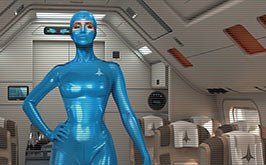
Start: December 2013 (first draft text)End: December 14, 2025 (image)Size: 4000x2250There was a MNW story planned to be added to this image today, but I found myself struggling with another MNW story file, one I thought I had uploaded and worked, but when I loaded it up last week all I got was an black page. I've since then tried to find out what's wrong with it, it also had (at least here) trouble with the sound, and only an hour ago I figured out what is causing (again at least here using Safari browser) the trouble.I had added an option to go full screen with a script for it as a beta test. There just seems to be something, a 'variable', missing and I have no clue what that 'variable' is. I'll have to ask around. But I've removed all the code to enter and exit full screen and the story that goes with the "First Night experience" seems to work now as planned.That means you have to wait to find out what this "Twist in The Sky" is. And no, I have no idea why the short version of this is spelled 'T.i.T.S. I am also working on finishing the story behind the recent image of 'The constricted voluptuousness'.This took once again much longer to finish than planned. I had hoped to have it ready by last Sunday, but at that moment I was just starting to render the background out. I take a bit more time to look over a finished image in an attempt to avoid making "mistakes" and oversights that have to be corrected later, like @baum23 found this elbow floating in Marlene's mirror reflection:I still cannot believe I missed that. Guess my eyes where somewhere else. But thank you Baum23 once again. It would be nice if you all could please erase this mistake and swap the elbow version for this file in your 4F collection?Back to "Twist in the Sky," I started this a while ago. In fact, I wrote part of the story back in 2013! I just couldn't figure out how to create an image for it and completely forgot about it until a few months ago, when I accidentally stumbled upon it again while trying to clean up my hard drive.I picked it up in September but there was something missing there. I dunno, maybe that large parts where made by others didn't help either. I just did not like were this was going.So I started over from scratch:I kept the chairs (for now) because of the proportions and I initially wanted to make a whole wall with 4 windows, but I realized it would be much quicker to make just 1 section of it, with just 1 window, if I wanted to add or change anything to the windows.Once that was "done," it was time to make my own passenger seat. I don't do that in a few hours (I think 2-3 days). There's a lot involved: zooming in, zooming out, rotating, adding, removing, modifying, resetting, and so on, before I'm satisfied. Buying third-party 3D models is much faster, but I think doing it yourself is more satisfying in the end. I'm not all too happy about the chairs bottom part but for now that's not going to be visible in this image. And so I moved on to building and adding at the planes interior.In the end I build and filled a whole cabin for the shiny flightattendant inside the stratosphere-plane. I may be considering a second version. Maybe remove the zipper, just follow the natural body curves, and add the rest of her legs.What do you think? Yes/No?-
-
- 7 replies
Featured by Rick 4F -
-
The constricted voluptuousness (final)
Start: 29 Januari, '25.Finish: 23 October, '25.Landscape (DoF), 4000 x 2250.Landscape, 4000x 2250.Close-up (DoF), 2400 x 3000.Close-up, 2400 x 3000.Considering the mess left behind by the last batch of 'students', the Mentrix decided it was 'clean-up time'.And so she ordered the current batch of students to clean up the place. Removing the stickers, put the left behind hanging rubber and plastic panties in the trash and tidy up the place so it looked like new, well almost. To reward the hard working women, she made some harsh calls 'upstairs' and demanded better furniture to sit on and at.I completely agree with the "Mentrix,"also because the whole place needed some fine-tuning. There were holes in the 3D walls, items and objects were missing, and yes, that table and chairs in the corner (a "quicky"), sucked donkey-ears.The missing parts weren't visible in the renders that used this space, but once I knew where I wanted to go with the next image, I couldn't leave things as they were.That wasn't easy, however, because the model in the original photo was photographed in a brightly lit, luxurious (hotel) room with bright, yellow and salmon pink (after color correction) colors. And then I decided to place her in a cold, sun-protected, metal environment, (maybe I like to challenge myself). I hope I got away with that.There's always a story behind an image. I'll try to upload this one next Sunday. -Sundays- are the days I try to post my latest updates. That gives you something to look forward to, and for me, it provides a deadline I have to try to meet.Ideally, I have a new image ready every two weeks. That's usually not possible, but that's what I strive for. This image was supposed to be finished last Sunday, but there were too many loose ends and decisions getting in the way, so I moved my "deadline" for this image to today.(Sidenote) When I had my own one-man business working for advertising agencies, they often came in on Friday afternoon with a job that had to be done the following Sunday afternoon. It gave me a clear overview of what to do and when. I'm trying to get back into that rhythm a bit.I've uploaded two versions of each, one sharp and one more realistic with DoF (depth of field). The close-up should be considered as an "extra", the landscape version is my main version.PS: sorry about the lines through some of the images here, that's to counter "ai" image enlargers/restorers.... Please let me know your thoughts!--Rick-
-
- 5 replies
Featured by Rick 4F -
-
The Box
I inherited from my parents a heavy locked metal box, which my dad inherited from his dad.
There was no key to open it, and it ended up, for over 30 years, high up in the back of my parents' closet, where I rediscovered it last year after their passing.
It took a while before I found a locksmith willing to come open it for me. I'd hoped that whoever finally showed up would be able to open it without damaging the box. Unfortunately, that proved impossible, so the locksmith drilled/sawed out the lock and gave it to me, unlocked but unopened.
*Ka-tching* that's then €120,- Euro's sir.
It's been standing here on a glass table since May 21, still unopened.
I think it's time to discover what's inside. I don't think my wild fantasy will come true, like there being gold in it, or fingers... (I've seen too many horror movies). But it will be interesting to see what my grandfather considered so precious that he had to store it. (He was, among other things, a coin and stamp collector and a lover/collector of female beauty, last just like my other grandfather.)
What do you think will be inside this box?-
- 2 replies
Featured by Rick 4F -
-
Say 'Hi' or introduce yourself here and become an Advanced Member.
After signing up for free to the 4F website there are 2 easy ways to upgrade to the (free) 'Advanced Members' group.Just say hi (by replying to this topic), or write a bit more if you like, and you become automatically an 'Advanced Member' to this site.Or:Follow a forum or gallery here on 4F-Creations.Please note that you must have the option enabled to receive an occasional (short, 1-2x/month) newsletter. After becoming an 'Advanced Member', you can unsubscribe from the 4F newsletter if you want. (But then you won't know if and when I add new stuff to this place.)As an 'Advanced Member' you will get access to many features of this 4Forum and of course - Access to ALL the 4F artwork images in high resolution until 2016. All that for the price of one post or 'follow' here. Do not hessitate to ask if you have any questions. I'll do my best to answer, if time permits me.Sincerely,--Rick (4)F. van Koert-
-
- 223 replies
 Featured by Guest
-